
Custom Labels guide
A new guide is available in Product docs for the Custom Labels self-managed workspace.
- Custom Labels: assign values to your Google custom label fields (
custom_label_0throughcustom_label_4), with search and select, preview per export, rule management, and publishing controls.
The guide lives alongside Exclude/Include Products in the Self-managed workflows sidebar section.
Docs MCP Server: clearer scope and Claude Code setup
Thanks to user feedback, the page for connecting AI tools to the Feedonomics docs is now Docs MCP Server, says up front what the server does, and clarifies the Claude Code setup instructions.
- Docs search only. The server lets your agent search and reference the documentation. It has no access to your account, feeds, or settings. To work with account data, use the Feedonomics API.
- Claude Code setup in three steps. Copy, run, confirm, with the single-project and every-project (
--scope user) commands shown side by side so you pick before you run. - Buttons described accurately. Connect to Cursor installs the server directly. Connect to Claude Code copies the install command for you to paste.
Step-by-step API token guide on the Authentication API page
The Authentication API landing page now walks through the full token flow instead of linking straight to the endpoint reference.
- Three steps with examples — request a 2FA token, exchange it for an API token, and send the token in the
x-api-keyheader, each with acurlrequest and the expected response. - Which APIs use the token — the page lists the APIs that accept the
x-api-keytoken and points FeedAMP Order API users to their separate token endpoint. - Clearer endpoint reference — the
POST /loginrequest fields now say which step they belong to, and the error response is now documented as400with an example. Earlier docs listed it as401, which the endpoint doesn’t return.
Account and self-managed workflow guides
Three new guides are available in the Product docs for managing your account and running self-managed workflows:
- User Access Control: the four access levels, account-level vs database-level scope, the Primary User role, and how to add, update, or remove users yourself.
- FeedSupport Portal: where to find the portal, what’s on the home screen, how to submit a request, and how to check on existing tickets.
- Exclude/Include Products: the self-managed workspace for excluding products from your exports or bringing them back, with previews per export, rule management, and publishing controls.
The guides live in two new sidebar sections, Account & support and Self-managed workflows. Further workflow guides will be added to Self-managed workflows as each ships.
Documentation for FDX Enrichment
New product documentation walks you through FDX Enrichment — turning thin catalog data into high-quality, brand-aligned content that flows to every channel your feed reaches.
- Getting started — a 30-minute first-run walkthrough takes one small batch from selection through review to publish.
- How it works and how to set it up — generation configs, brand voice, source-data guidance, quality scores, and reviewing results.
- Channels and impact — where enriched fields go, how transformers and exports interact, and how to measure results with A/B testing and Analytics.
For details, see What is FDX Enrichment?.
Downloadable FeedAMP SFTP sample files
The FeedAMP SFTP V2 guide now offers the integration specs and sample files as direct downloads, so you can grab them without leaving the page.
- Integration specs — download the field specifications workbook directly from the Fields Format section
- Sample files — download example Orders, Processed Orders, Order Refunds, and Returns files to model your own output
For details, see FeedAMP SFTP V2.
Availability badges in the sidebar
The documentation site now shows availability badges in the sidebar navigation, making it easier to spot the status of a page before you open it. This is a documentation-site improvement, not a change to Feedonomics itself.
- Beta and deprecated indicators: pages marked beta or deprecated now surface that status directly in the sidebar.
- Faster scanning: identify pre-release and legacy content at a glance while browsing the navigation.
Clearer two-step flow for generating an API token
The Authentication API reference now documents the full two-step process for obtaining an API token, making it easier to authenticate your requests.
- Step-by-step flow — the
/loginendpoint now shows how to first request a 2FA token, then exchange it for an API token. - Request and response examples — separate examples for each step clarify the parameters and payloads involved.
- Error responses — added a
401response so you can handle failed authentication attempts.
For details, see the Authentication API reference.
Connect our docs to your AI agent
We’ve added a dedicated AI Agent Setup page that walks you through connecting the Feedonomics developer docs to your AI tool — so it can answer questions grounded in our documentation instead of guessing.
- One-click install for Cursor and Claude Code via the Copy page dropdown in the upper-right of any docs page
- Manual setup snippets for Cursor, Claude Code, Codex, and Claude Desktop
- Bottom-pinned sidebar link on every tab so the page is reachable from anywhere on the site
Powered by the docs site’s MCP server at https://docs.feedonomics.com/_mcp/server.
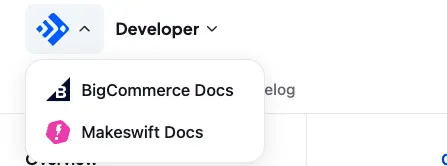
Quickly jump between Feedonomics, BigCommerce, and Makeswift docs
Thanks to your feedback, the header logo is now a site switcher. Click the logo at the top-left of any page to open a dropdown and jump straight to the BigCommerce or Makeswift docs without leaving your tab.
Keep the feedback coming.