
Feedonomics Companion
The Feedonomics Companion is the AI assistant built into Channel analytics. Instead of navigating reports and setting filters, you ask a question in plain language and get an answer from your connected data — and Companion can also draft fixes for listing errors.
Companion is currently in beta. It’s off by default and an account owner enables it for the whole account — see Enable Companion below.
What it can do
The Companion answers questions about the data in your Analytics reports — traffic, paid media, and AEO activity — including:
- Metric lookups — “What was my revenue from paid search last month?”
- Comparisons over time — “How does my conversion rate this quarter compare to last year?”
- Channel and segment questions — “Which campaigns had the best ROAS?” or “How much traffic came from ChatGPT?”
- Enrichment measurement — “Did my ChatGPT traffic, add-to-cart, and revenue go up after enrichment?”
- Listing error fixes — beyond answering questions, Companion drafts fixes for listing errors it finds in your channel data.
It works from the same connected sources as the dashboard, so what it can answer depends on what you’ve onboarded — a merchant with only Google Ads connected gets paid media answers; a BigCommerce merchant with both gets the full picture.
Enable Companion
Companion is enabled per account, by an account owner. The toggle controls availability for everyone in the account, and changes apply immediately for all users.
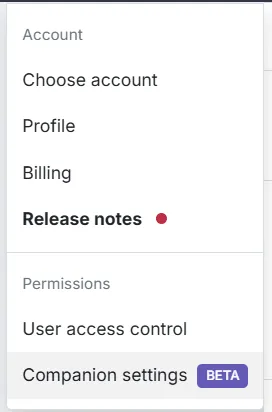

Managing this setting requires account-level administrative access — it sits alongside User Access Control in the same Permissions menu. If you don’t see Companion settings, ask whoever manages your account’s user grants.
How to ask good questions
The Companion does best with the same specificity a colleague would need:
- Name the metric — “sessions”, “ROAS”, “conversion rate” — rather than “performance.”
- Name the segment — a channel, campaign, custom label, or product group.
- Name the period — “last 30 days”, “since June”, “compared to last year.”
“How did enriched products do?” is answerable; “revenue and CTR for products labeled enriched-titles, last 8 weeks vs. the 8 weeks before” gets you a sharper answer on the first try.
Where it fits
Use the dashboard when you’re exploring — trends, tables, and drill-downs reward looking around. Use the Companion when you have a specific question and want the answer without the navigation, or when you’re checking the same few numbers on a routine.