
A/B testing enriched content
The most convincing case for enriched content is a controlled split test on your own feed. This playbook walks through running one with the tools already in your Feedonomics account. You own the test and the analysis; this is the method.
You’ll need your paid media data connected and your products tagged, since group segmentation relies on custom-label reporting in Google Ads — see Analytics onboarding and Measuring impact in Analytics. If you’re not ready for a full split test, the simpler baseline-and-holdout approach in Proving enrichment works is a reasonable first step.
The method at a glance
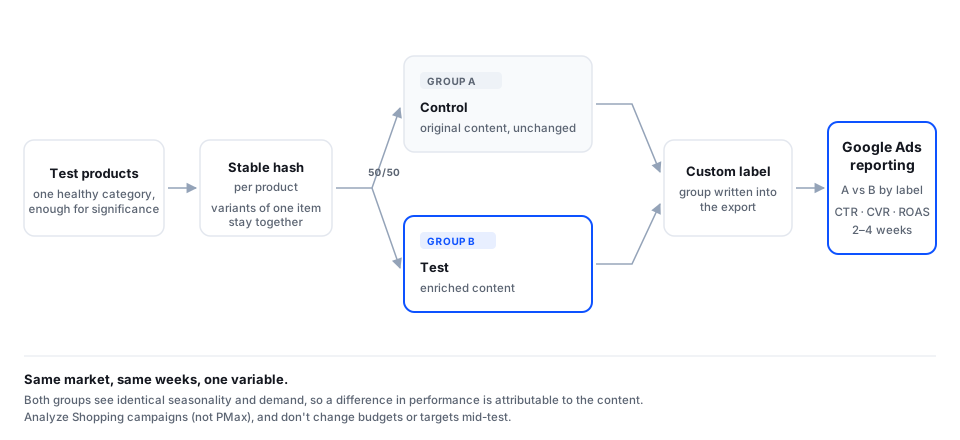
Form a hypothesis
One variable, one expected outcome: “Enriched titles will improve CTR on our Google Shopping traffic.” Titles are the classic first test — they’re the highest-impact field.
Select your test products
Big enough for statistical significance, similar enough to isolate the variable. One healthy category beats a random scatter across your whole catalog.
Split 50/50
Assign each product a random group with transformers: generate a stable hash per product, then split on it — half to Control (A, original content), half to Test (B, enriched content). Keep variants of the same product in the same group so a single item group never straddles both arms.
Label the groups
Write the group assignment to a custom label in your export so you can segment by it in Google Ads reporting.
Caveats that save tests
- Mind seasonality. Slow weeks depress everything; sale weeks inflate ROAS. Note anything unusual in the window.
- Analyze Shopping campaigns, not Performance Max. PMax blends surfaces at the campaign level and will muddy your read.
- Freeze campaign settings. Don’t change budgets or ROAS targets mid-test — you’d be testing two things at once.
- Check your conversion tracking is revenue-based before you start, or ROAS comparisons are meaningless.
Google’s native Experiments feature tests campaign settings. This playbook tests feed data. They’re complementary — just don’t run both on the same traffic at the same time and expect a clean read.
After the test
A winning test tells you which field to enrich next, and in what order. Titles first, then descriptions, then the detail fields — Where enriched fields go shows what’s available per channel. To expand a winner across your catalog, run a larger batch with the same config: see Re-running enrichments.