
Usage, billing, and limits
FDX Enrichment is contract-based: your agreement includes an allotment of enrichments to use during your term. Here’s how usage works, how to track it, and what to do when you need more.
How usage is counted
Usage counts every enrichment you send for processing — not just the results you accept. If you run 1,000 products and accept 600, all 1,000 count toward your contracted allotment. Set your quality thresholds and product selection deliberately before you run.
The allotment meter is shown before every run — what you’ve used, what this run will consume, and what remains.
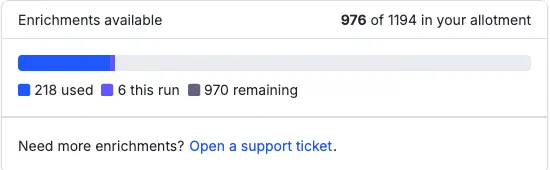
One enrichment = one item sent for enrichment in a run. Re-running an item counts again, which is why the smart workflow is: run a sample, tune your config, then run at volume — rather than re-running your whole catalog to fix a config issue.
Product level vs variant level changes your count
What counts as an “item” depends on the level you chose for the batch. At product level, each product is one enrichment. At variant level, each variant is one enrichment — so 200 products with six variants each is 1,200 enrichments rather than 200.
This is the single biggest lever on how fast a batch consumes your allotment. Before a large run, check the level and the cost panel together. Full detail in Product level or variant level.
Your allotment
- It’s a hard cap. When your allotment is used, enrichment stops — there are no surprise overage charges, ever.
- It applies everywhere. The cap is enforced on the server, so API-driven runs draw from and respect the same allotment as runs from the UI.
- It’s shared at the account level. If your account covers multiple brands or databases, they draw from one shared pool — worth coordinating if several teams run enrichment independently.
Tracking usage
The enrichment panel shows your live position before every run: allotment used, what the current run will consume, and what remains. Check it before large runs — the panel is your pre-flight confirmation, not an after-the-fact report.
Getting more
Need a bigger allotment or hit your cap mid-initiative? Reach out to your account team — additions are handled through your contract.