
Inputs and what happens to them
Config setup asks you for four things. Each one steers the output differently, and knowing how helps you decide where to invest your effort.
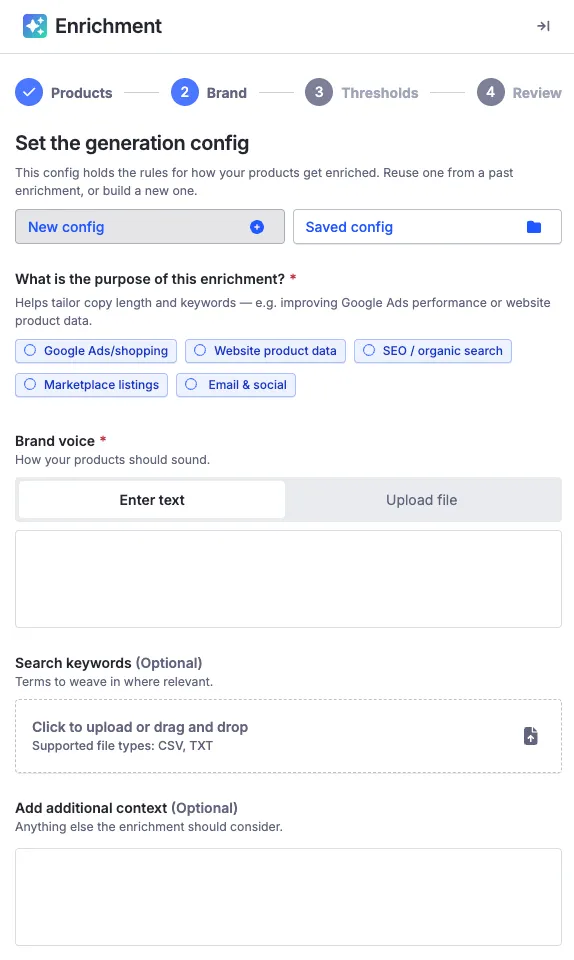
All four are read by an agent that writes the actual rules for your run, field by field — see How your inputs become rules.
The four inputs
Purpose
A multi-select: what are you optimizing for? The options are Google Ads/shopping, Website product data, SEO / organic search, Marketplace listings, and Email & social — pick what applies. Purpose steers how every field gets written: copy optimized for ads leads with what earns the click; copy optimized for your site leads with what closes the sale.
Brand voice
Free text plus optional document upload, limited to 10,000 characters. This is the highest-leverage input — give it a full page of attention.
Search keywords
Upload a .csv or .txt of your target keywords. The engine weaves them into descriptions and SEO fields where they fit naturally — no keyword stuffing, which would hurt both your rankings and your quality scores.
Use your actual search-query data, not aspirational head terms. The keywords real shoppers use are the ones enrichment can work into copy credibly.
Additional context
Single-line instructions that fall outside your brand voice, or specific concepts you want the agent to pay attention to — positioning for this product line, an audience nuance, a detail about the catalog it wouldn’t infer. Context steers generation for every field but isn’t stored as a config setting; think of it as a briefing note for this config. See Additional context for how to write them well.
What’s kept and what isn’t
Your finished config and its plain-English summary are saved for reuse. The raw materials — uploaded documents, keyword files, context notes — are used to build the config and not retained.
Once your inputs are in, the config builder does the rest — see Generation configs for what it produces and the rules it follows.