
Generation configs
A generation config is the recipe for your enrichment runs. It captures everything the engine needs to know about your brand, your goals, and your rules — so you set it up once and every run after that starts from a proven baseline instead of a blank page.
How your inputs become rules
Your inputs don’t get handed to the generator as-is. An agent reads them and writes the rules for the enrichment run — and it writes those rules at the field level.
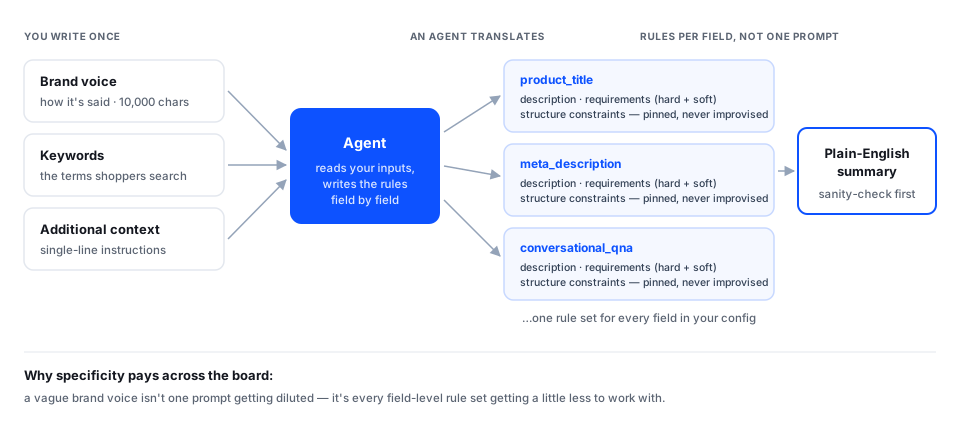
That distinction matters. You describe your brand once, in one place. The agent takes your brand voice instructions, your keywords, and your additional context, and translates them into specific instructions for every individual field the run will produce — what a product title should do with your voice, what a meta description should do with your keywords, what a conversational Q&A should emphasize.
For each field, the agent writes:
- A description of what that field should contain, with your brand and goals already baked in.
- Requirements — both hard rules (length limits, formats) and soft guidance (tone, emphasis).
- Structure constraints that pin the output to exactly the shape the field expects.
This is why a vague brand voice input produces flat results across the board: it isn’t one prompt getting diluted, it’s twenty field-level rule sets each getting a little less to work with.
You get back a plain-English summary of what the config will do, plus per-field reasoning, so you can sanity-check the rules before spending a run on them.
The inputs you provide
Brand voice
Your voice, tone, do’s and don’ts, restricted claims, and vocabulary. This is the input that most affects your results, and it’s worth real effort — see Teaching enrichment your brand voice for what to include.
That’s a generous amount of room — several pages of guidance — but it does mean a full brand book won’t fit verbatim. If you’re up against the limit, keep the parts that change how a sentence gets written (personality, tone by context, do’s and don’ts, restricted claims, vocabulary) and drop the parts that don’t (history, logo usage, color palettes, print specifications).
Additional context
Anything the agent should know that isn’t brand voice. Use single-line instructions — short, direct statements rather than prose.
Additional context is the right place for two things:
- Instructions beyond the scope of your brand voice. Guidance that isn’t about how you sound, but about what this run should do. “Prioritize durability and load capacity over aesthetics.” “These are professional-grade tools, not consumer DIY.”
- Specific concepts the agent should pay attention to. A detail you know matters for this catalog that the agent wouldn’t infer on its own. “Sizing runs small — mention fit guidance where relevant.” “Assembly is required on all items in this collection.”
Keep each instruction to one line and one idea. A list of five sharp single-line instructions steers generation far better than a paragraph, because each one lands cleanly in the field-level rules the agent writes.
Ask whether it would still be true on a different set of products. If yes, it’s brand voice — it belongs everywhere. If it’s specific to this catalog, collection, or run, it’s additional context.
Keywords and purpose
Your target search terms and what you’re optimizing for. Both are covered in Inputs and what happens to them.
The rules configs live by
Configs are versioned, never edited. When you want to change something, you create a new config rather than modifying the old one. This means every run is traceable to exactly the configuration that produced it, and a config that worked last month still works the same way today.
Structure is never improvised. The shape of each output field — its length limits, format, and schema — is fixed by the platform, not generated. The AI writes the words; it doesn’t get to redesign the fields.
Gaps get flagged, not papered over. If your inputs are missing something critical, config creation stops and tells you what’s needed. Minor gaps are advisory — you can proceed, with eyes open.
Your raw inputs aren’t kept. Only the finished config and its summary are stored. The brand documents and keyword files you upload during setup are used to build the config, not retained afterward.
Saved configs
Every config you create is saved and selectable from a dropdown at run time. Most teams end up with a small library — one per brand, or one per major product category — and reuse them for months.
Ready to build yours? Start with Teaching enrichment your brand voice, then see Inputs and what happens to them for the full set of setup fields.