
The enrichment run
An enrichment run takes you from “these products need better content” to “approved content in my feed” in one guided flow. Here’s the whole journey.
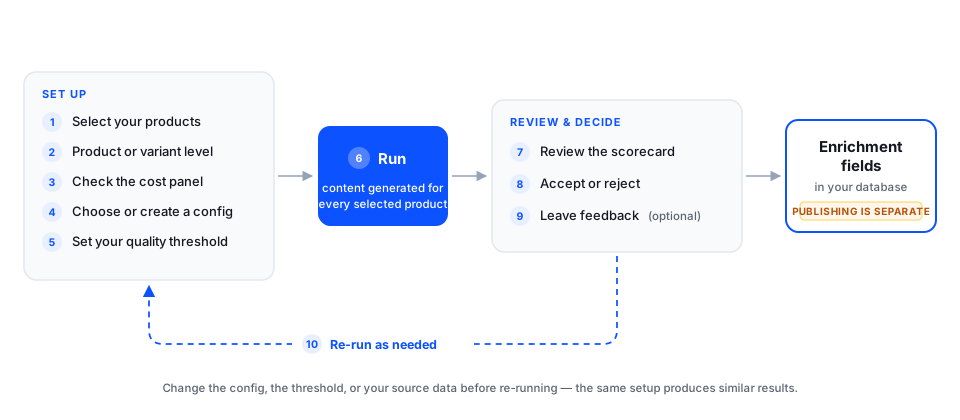
Select your products
Choose the products you want to enrich — the run takes the products currently shown in your data table, so filter the table to the batch you want. Start small on your first run: a representative sample of one category tells you far more than a scattershot thousand. How varied this set is determines how specific your config can be, which is the difference between a coverage enrichment and a depth enrichment: see Enrichment strategy.
Choose product or variant level
Decide whether this batch enriches at the product level or the variant level. You set this per batch, so different batches can work differently. See Product level or variant level below.
Check the cost panel
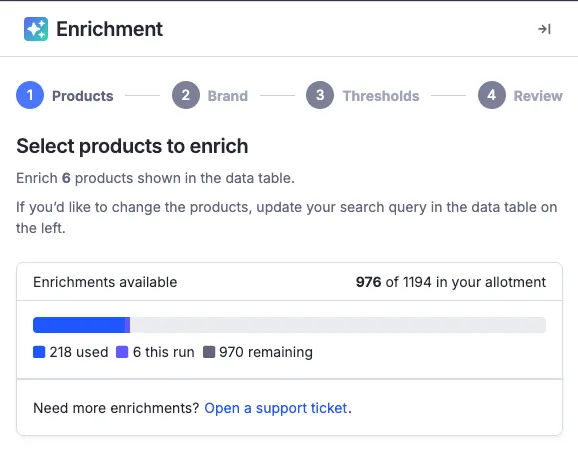
Before anything runs, the enrichment panel shows your usage: how much of your allotment you’ve used, what this run will consume, and what remains. No surprises.
Choose or create a config
Pick a saved generation config from the dropdown, or create a new one. A config captures your brand voice, keywords, and goals — set it up once, reuse it on every run. See Generation configs.
Set your quality thresholds
Decide the minimum quality score you’ll accept. Results below the threshold are held for your review rather than approved.
Review the scorecard
Every product comes back with a quality score and a side-by-side view: enriched content next to your original data, so you can judge the change at a glance.
Accept or reject
You’re in control of what ships. Accept everything, accept everything above your threshold, or go row by row.
Product level or variant level
Enrichment runs at either the product level or the variant level, and you choose which for each batch.
Product level generates one set of content per product. Every variant inherits it. This is the right choice when your variants differ in ways the copy doesn’t need to describe — a t-shirt in eight sizes usually needs one description, not eight.
Variant level generates content for each variant individually. Choose this when the differences between variants are genuinely part of the story: distinct colorways with their own names, materials that vary by option, or channels where each variant is listed and needs to stand on its own.
A batch of 200 products with six variants each is 200 items at product level and 1,200 at variant level. Since usage counts every item you send, the level you choose has a direct effect on how much of your allotment a batch consumes. Pick deliberately, especially on large runs.
A practical middle path: run most of your catalog at product level, and use variant-level batches for the product families where color, material, or size genuinely changes the pitch.
Where the output goes
Enrichment writes to new, dedicated fields in your database, applied as a raw data override — your imported source data is never replaced, and you can always compare what came in against what enrichment produced. Because the enriched value sits in the raw layer, everything downstream can act on it: transformers, transformed data overrides, and the feed build process.
Accepted content lands in its own enrichment fields and behaves like any other raw field from that point on — your transformers can act on it. Your first run changes nothing downstream; you map those fields into your exports when you’re ready. The details live in Enrichment, transformers, and exports, and Where enriched fields go maps each generated field to its destination.
One thing to plan for
Usage counts every enrichment you send for processing — not just the results you accept. If you run 1,000 products and accept 600, all 1,000 count toward your contracted allotment. Set your quality thresholds and product selection deliberately before you run.