
Enrichment, transformers, and exports
If you already run feeds through Feedonomics, the good news is: enrichment slots into your existing pipeline without changing how any of it works. This page is for the person who owns that pipeline.
Enrichment writes to its own fields
Enriched content is added to your database as its own unique fields, applied as a raw data override — so it sits in the raw layer, alongside your imported data rather than on top of it.
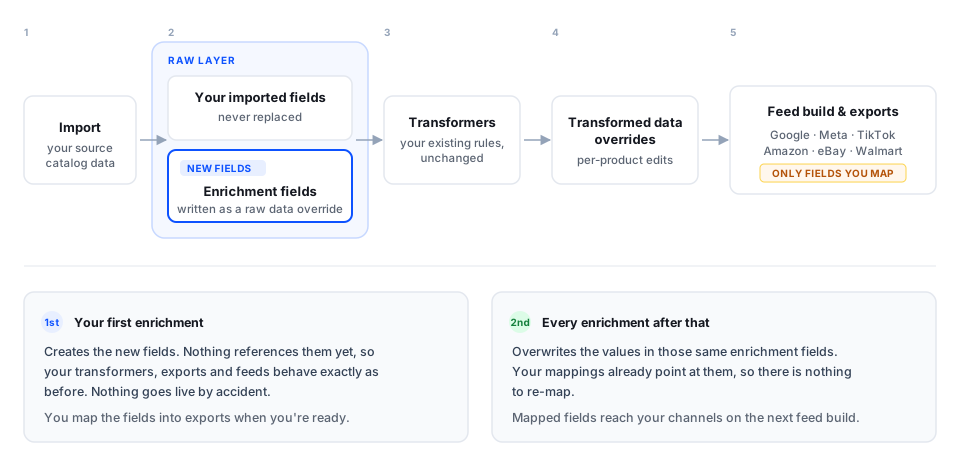
The pipeline order is:
- Import — your source data lands, exactly as always.
- Raw data override — accepted enrichment output is written to its own enrichment fields. Your imported values aren’t replaced.
- Transformers — your rules run, and can act on enriched fields like any other raw data.
- Transformed data overrides — per-product adjustments apply as usual.
- Feed build and exports — your channel templates map whichever fields you choose.
Your first enrichment changes nothing downstream
This is the part worth understanding before you run anything.
The first enrichment creates new fields. Nothing in your existing setup references them yet, so your workflow, your transformers, and your exports all keep behaving exactly as they did before. Your feeds don’t change. Nothing goes live by accident.
That’s deliberate: enrichment is opt-in at the export layer, so accepting results and publishing them stay two separate decisions.
Mapping enriched fields to your exports
Because nothing references the new fields yet, you have to map them into your exports yourself. Until you do, enriched content sits in the database unused.
This is where your control lives. Map one field to one channel and leave everything else alone — enriched titles to Google while Meta keeps the originals — and expand from there at whatever pace the results justify.
Subsequent enrichments update automatically
Re-enriching a product overwrites the values in those same enrichment fields. The fields already exist and your export mappings already point at them, so there’s nothing to re-map.
The practical consequence: once a field is mapped, downstream effects appear automatically on the next feed build. A second enrichment run will change what goes out to your channels without any further action from you.
Before the first mapping, an enrichment run is safe to experiment with — nothing reaches a channel. Afterwards, a re-run propagates to your live feeds on the next build. Use your quality thresholds and review results before running at volume on fields you’ve already mapped.
Enrichment writes to new, dedicated fields in your database, applied as a raw data override — your imported source data is never replaced, and you can always compare what came in against what enrichment produced. Because the enriched value sits in the raw layer, everything downstream can act on it: transformers, transformed data overrides, and the feed build process.
What this means in practice
Your existing transformers keep working, untouched. They reference the same fields they always did. Because enrichment adds fields rather than changing existing ones, no rule’s inputs change and no rule needs rewriting.
You can transform enriched fields too. Want to append a size suffix, or apply a channel-specific truncation? Write transformers against the enrichment fields exactly as you would against any raw field.
Per-product corrections use transformed data overrides. Same tool, same workflow as any other manual correction. Details in Editing enriched content.
The thing to review isn’t the enrichment run — it’s the mapping. If a transformer currently builds your exported title from raw fields, mapping an enriched title into that same export can mean two pieces of logic competing for one output, and heavy legacy title-building can undo the enrichment you just paid for. Before you map a field, review the transformers feeding that export field and decide whether that logic should stay, be simplified, or be retired.
A safe rollout pattern
- Enrich a small batch and accept results — nothing reaches a channel yet.
- Review the transformer logic on the export field you intend to map.
- Map one field, one channel, and check the built output — not just the enrichment scorecard — to confirm your transformers and overrides produced what you expected end to end.
- Measure on a segment via A/B testing before rolling out to the full catalog.
- Expand field by field, channel by channel, remembering that re-runs on mapped fields go live automatically.